The Poll Processor contains the logic that will be applied when polling a remote system for data.
The Poll Processor is a configuration record which contains the logic that will be applied when polling a remote system for data. There are three main scripts which are used to setup, execute and process the Poll Requests. The scripts given here are examples of how you might configure your Poll. The details of yours may differ depending on your requirements.
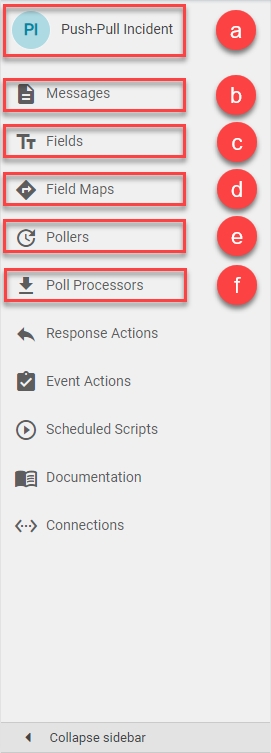
The icons are:
a) 'Integration' icon: Opens the current integration's Details page.
b) 'Messages' icon: Opens the current integration's Messages page.
c) 'Fields' icon: Opens the current integration's Fields page.
d) 'Field Maps' icon: Opens the current integration's Field Maps page.
e) 'Pollers' icon: Opens the current integration's Pollers page.
f) 'Poll Processors' icon: Opens the current integration's Poll Processors page.
In Unifi Integration Designer, navigate to & open < Your Integration > (created following the Outbound Incident Guide).
Click the 'Poll Processors' icon & then New.
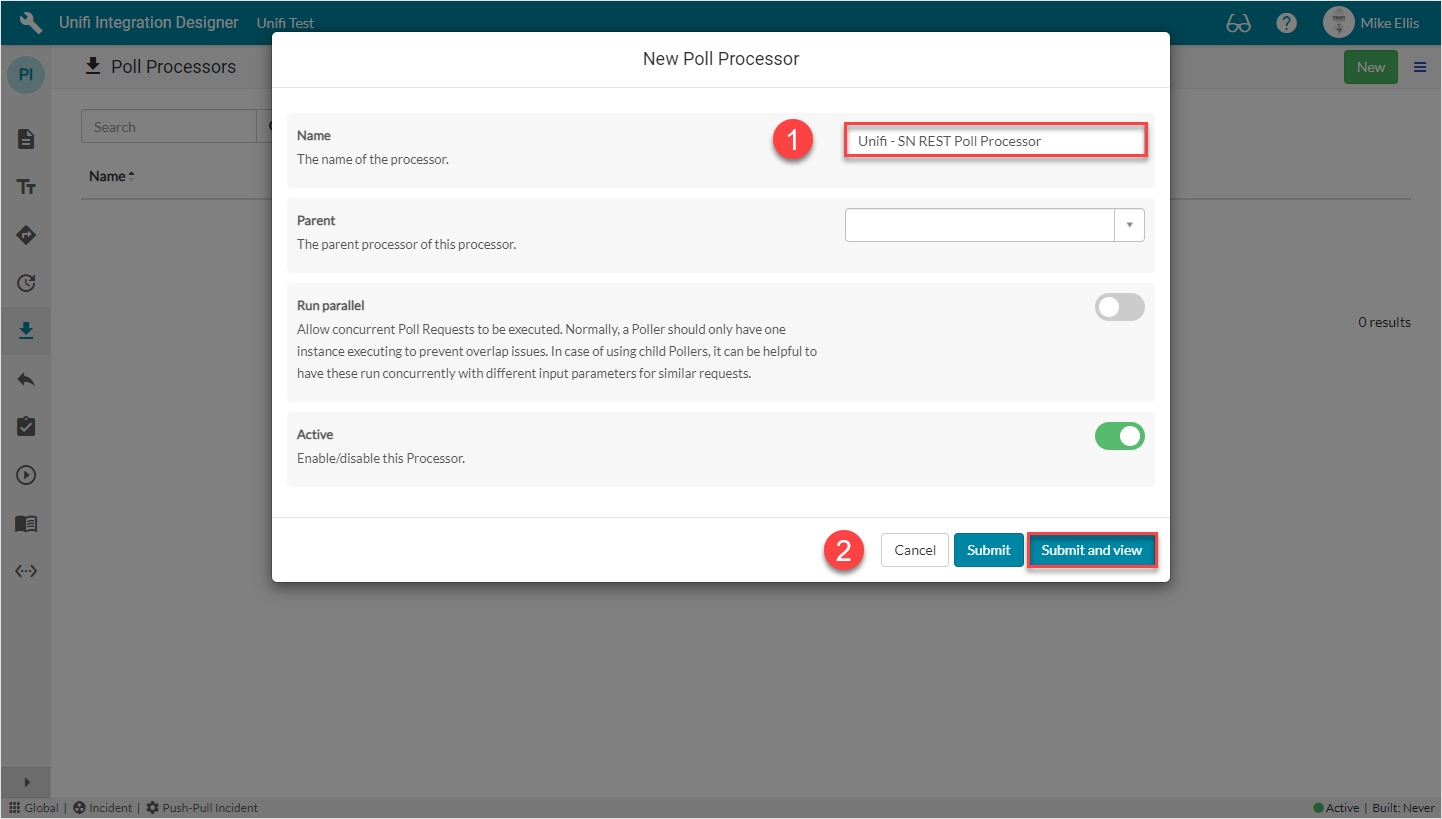
The fields to be configured for the New Poll Processor modal are as follows:
Your New Poll Processor modal should look like this:
Submit and view to further configure the Poll Processor.
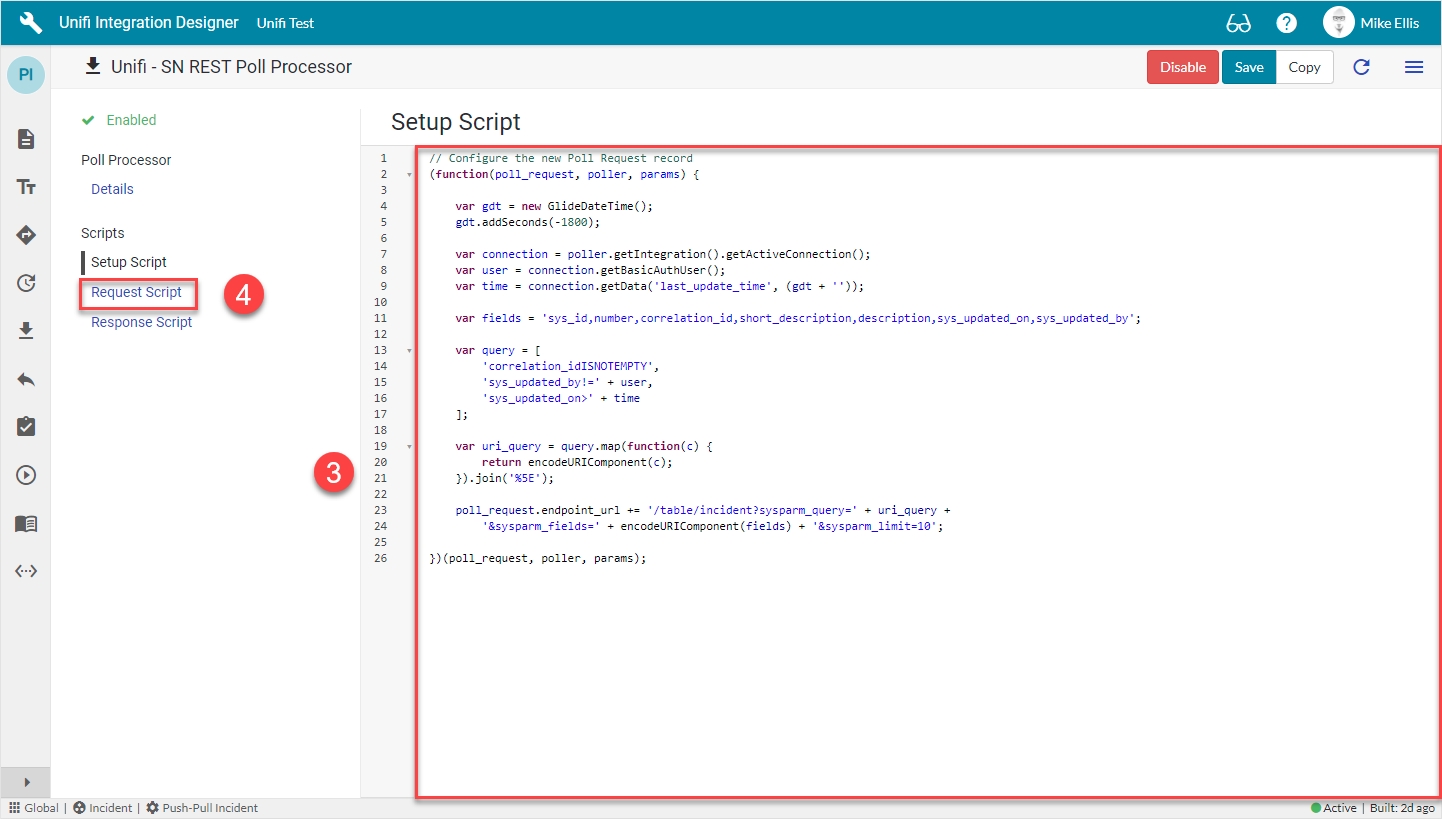
The Setup Script is the first script to run (it runs at the point in time the Poll Request is created). It is used to build the environment for the poll and define what it will do. We will use it to setup the URL that will be called.
Navigate to Scripts > Setup Script.
The Setup script field is to be configured as follows:
The code in the Setup script field should look like this:
Your Setup Script form should look like this:
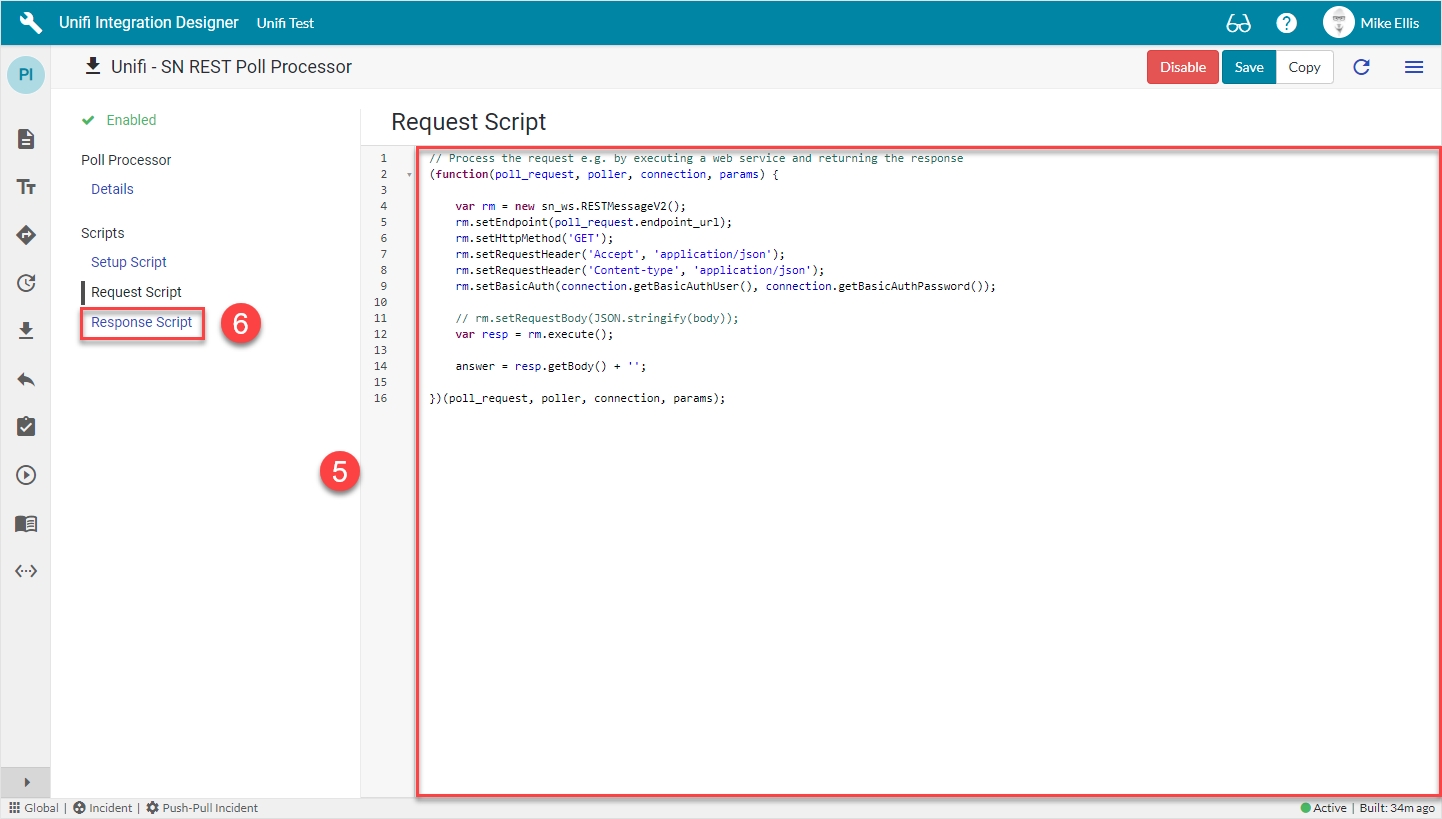
Navigate to Request Script.
The Request Script is used to reach into the remote system and execute the request. We will use the ServiceNow RESTMessageV2() web service to make a REST call to the URL defined in the Setup Script.
The Request script field is to be configured as follows:
The code in the Request script field should look like this:
Your Request Script form should look like this:
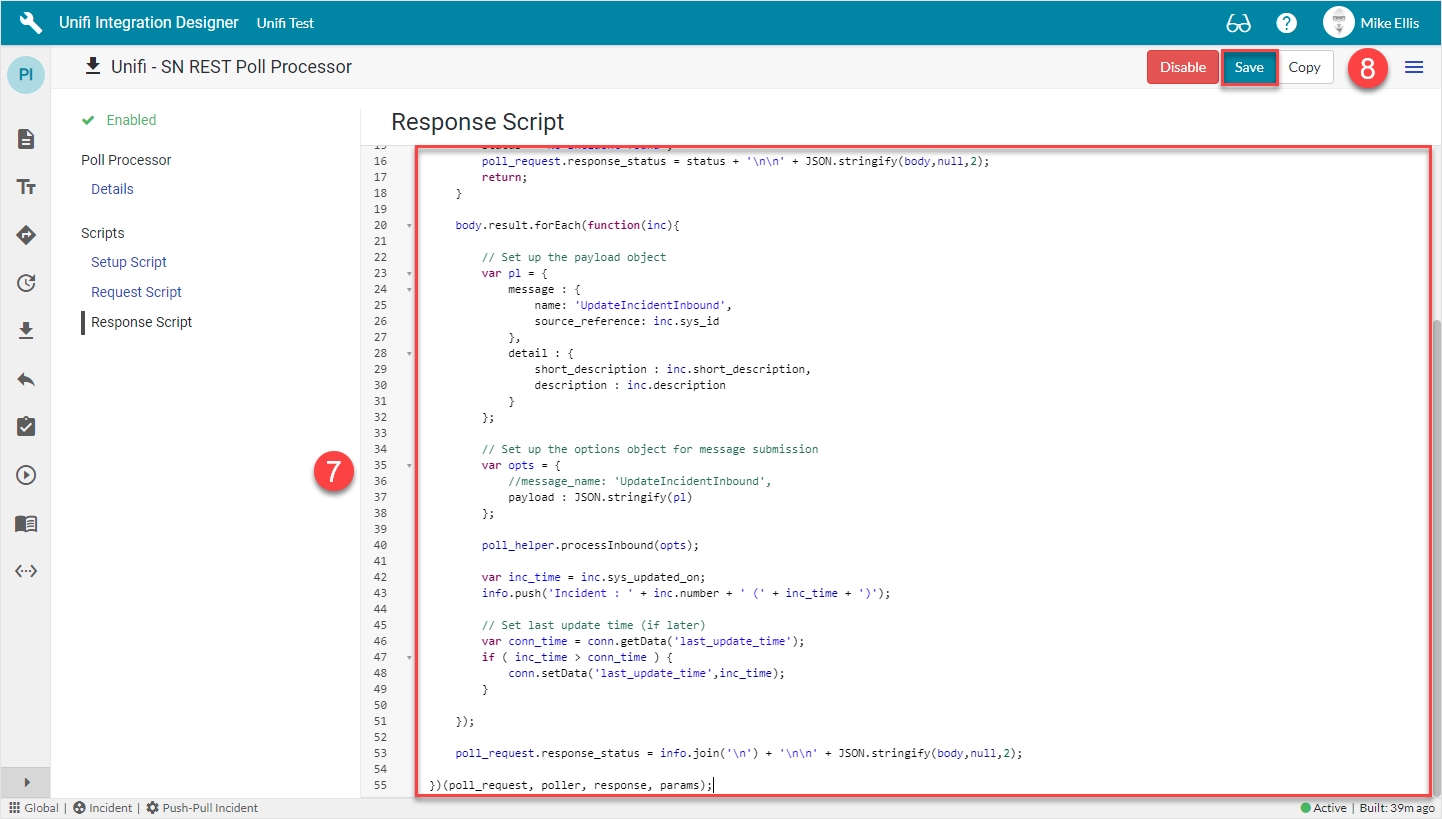
Navigate to Response Script.
The Response Script is used to process the information returned from the remote system. We will pass this data to Unifi to process.
The Response script field is to be configured as follows:
The code in the Response script field should look like this:
Your Response Script form should look like this:
Save the Poll Processor.
Now let's move on and configure the Poller.
Note: We have included the /table/incident element of the endpoint url because we used the truncated url in the Connection when following the Outbound Incident Guide. If you have used the full url there, then this element can be excluded here.
(We have also chosen to limit the number of records returned to 10.)
params: The params object is passed through to the subsequent scripts (and on to further Pollers, if required).
Payload object: We have chosen to structure the payload object (var pl) as we have. There is no obligation to keep the same structure. Yours can be defined to suit your requirements.
Payload options: In the payload options (var opts), we have commented out //message_name: 'UpdateIncidentInbound',. This is because we have chosen to include the message name in the structure of the payload object.
Message name: Unifi needs to know the message name in order to know how to process the inbound request. We can either set it in the payload (as we have), or in the options (as per the commented out line).
Name
The name of the Processor.
<Your Name>
Setup script
The script to setup the Poll Request record.
Update the code in the Setup script field so that it looks like the code below
Request script
The script that executes the request.
Update the code in the Request script field so that it looks like the code below
Response script
The script that processes the response to the request.
Update the code in the Response script field so that it looks like the code below
// Configure the new Poll Request record
(function(poll_request, poller, params) {

    var gdt = new GlideDateTime();
    gdt.addSeconds(-1800);

    var connection = poller.getIntegration().getActiveConnection();
    var user = connection.getBasicAuthUser();
    var time = connection.getData('last_update_time', (gdt + ''));

    var fields = 'sys_id,number,correlation_id,short_description,description,sys_updated_on,sys_updated_by';

    var query = [
        'correlation_idISNOTEMPTY',
        'sys_updated_by!=' + user,
        'sys_updated_on>' + time
    ];

    var uri_query = query.map(function(c) {
        return encodeURIComponent(c);
    }).join('%5E');

    poll_request.endpoint_url += '/table/incident?sysparm_query=' + uri_query +
        '&sysparm_fields=' + encodeURIComponent(fields) + '&sysparm_limit=10';

})(poll_request, poller, params);// Process the request e.g. by executing a web service and returning the response
(function(poll_request, poller, connection, params) {
var rm = new sn_ws.RESTMessageV2();
rm.setEndpoint(poll_request.endpoint_url);
rm.setHttpMethod('GET');
rm.setRequestHeader('Accept', 'application/json');
rm.setRequestHeader('Content-type', 'application/json');
rm.setBasicAuth(connection.getBasicAuthUser(), connection.getBasicAuthPassword());
// rm.setRequestBody(JSON.stringify(body));
var resp = rm.execute();
answer = resp.getBody() + '';
})(poll_request, poller, connection, params);// Process the response returned by the request script
// The 'answer' variable from the request script is passed in here as the 'response' parameter
(function (poll_request, poller, response, params) {
var body = JSON.parse(response);
// Process the result
var conn = poller.getIntegration().getActiveConnection();
var cvars = conn.getVariables();
var poll_helper = new x_snd_eb.PollHelper(poll_request);
var info = [];
if ( body.result.length == 0 ) {
status = 'No Incident found';
poll_request.response_status = status + '\n\n' + JSON.stringify(body,null,2);
return;
}
body.result.forEach(function(inc){
// Set up the payload object
var pl = {
message : {
name: 'UpdateIncidentInbound',
source_reference: inc.sys_id
},
detail : {
short_description : inc.short_description,
description : inc.description
}
};
// Set up the options object for message submission
var opts = {
//message_name: 'UpdateIncidentInbound',
payload : JSON.stringify(pl)
};
poll_helper.processInbound(opts);
var inc_time = inc.sys_updated_on;
info.push('Incident : ' + inc.number + ' (' + inc_time + ')');
// Set last update time (if later)
var conn_time = conn.getData('last_update_time');
if ( inc_time > conn_time ) {
conn.setData('last_update_time',inc_time);
}
});
poll_request.response_status = info.join('\n') + '\n\n' + JSON.stringify(body,null,2);
})(poll_request, poller, response, params);var poll_helper = new x_snd_eb.PollHelper(poll_request);poll_helper.processInbound(opts);