> For the complete documentation index, see [llms.txt](https://docs.sharelogic.com/unifi/llms.txt). Markdown versions of documentation pages are available by appending `.md` to page URLs; this page is available as [Markdown](https://docs.sharelogic.com/unifi/configure/how-to-guides/integrating-related-records.md).

# How to Distribute Comments between Parent/Child Tasks

A common use case many customers see in processes like Request is to have comments on both the Request and the Request Task shared over integration.

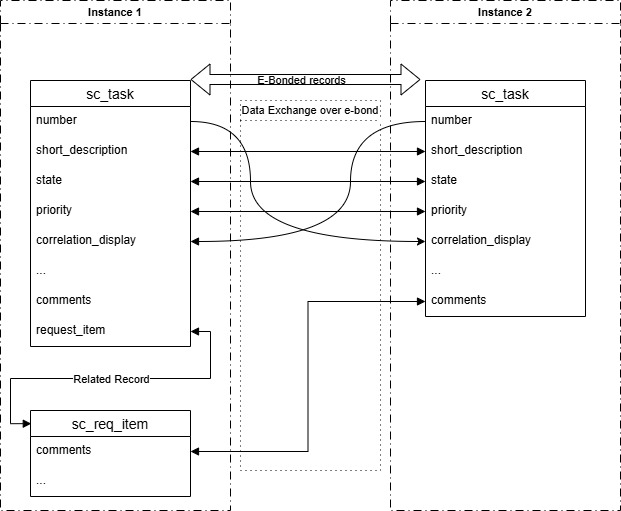
In this guide we have a bi-directional integration on the `sc_task` table. On one side of the integration comments are added to the related `sc_req_item` instead of the `sc_task`. These comments will be shared as part of the `sc_task` bond.

This diagram shows a high level interaction between the systems in the use case we will explore here.

<figure><img src="https://3662067745-files.gitbook.io/~/files/v0/b/gitbook-x-prod.appspot.com/o/spaces%2FDk6VgKBXe6rYT8F9wuaY%2Fuploads%2FfsAthnfuwzo6rZIc67AD%2FIntegration_of_related_records.jpg?alt=media&amp;token=7726f547-428d-44c0-809c-62a9b10844bd" alt=""><figcaption></figcaption></figure>

## Message

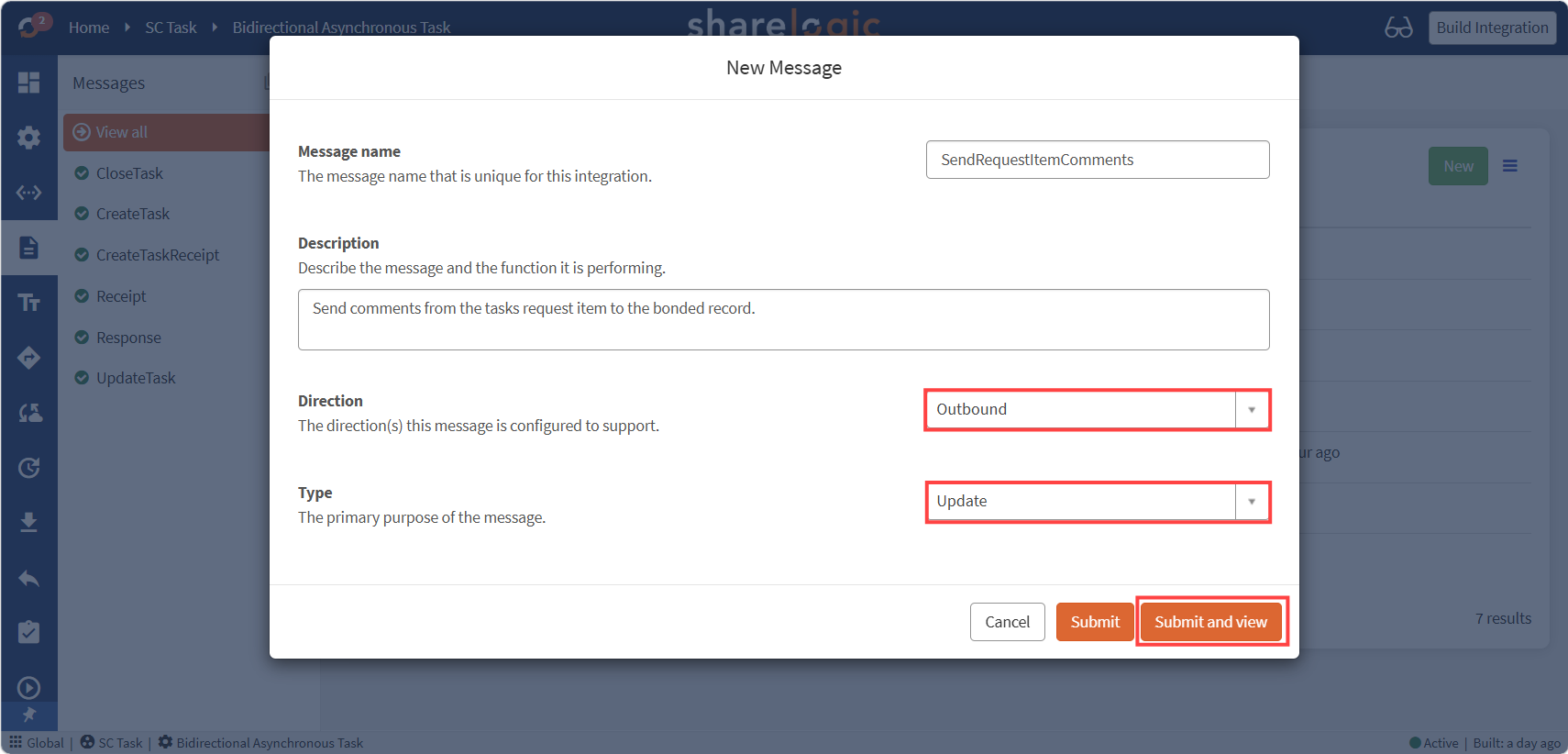
The first step is to configure a new **Outbound Message** to send data from the `sc_req_item`.

Create a new **Outbond Update** message for sending request item comments; this will be on the integration's source table `sc_task`, not on the `sc_req_item` table.

<figure><img src="https://3662067745-files.gitbook.io/~/files/v0/b/gitbook-x-prod.appspot.com/o/spaces%2FDk6VgKBXe6rYT8F9wuaY%2Fuploads%2FN2Mv8hchNkS7cWdwsFZB%2FIRE-Message.png?alt=media&amp;token=24c8101a-ebb7-4e60-bf8f-0344f5c8f437" alt=""><figcaption></figcaption></figure>

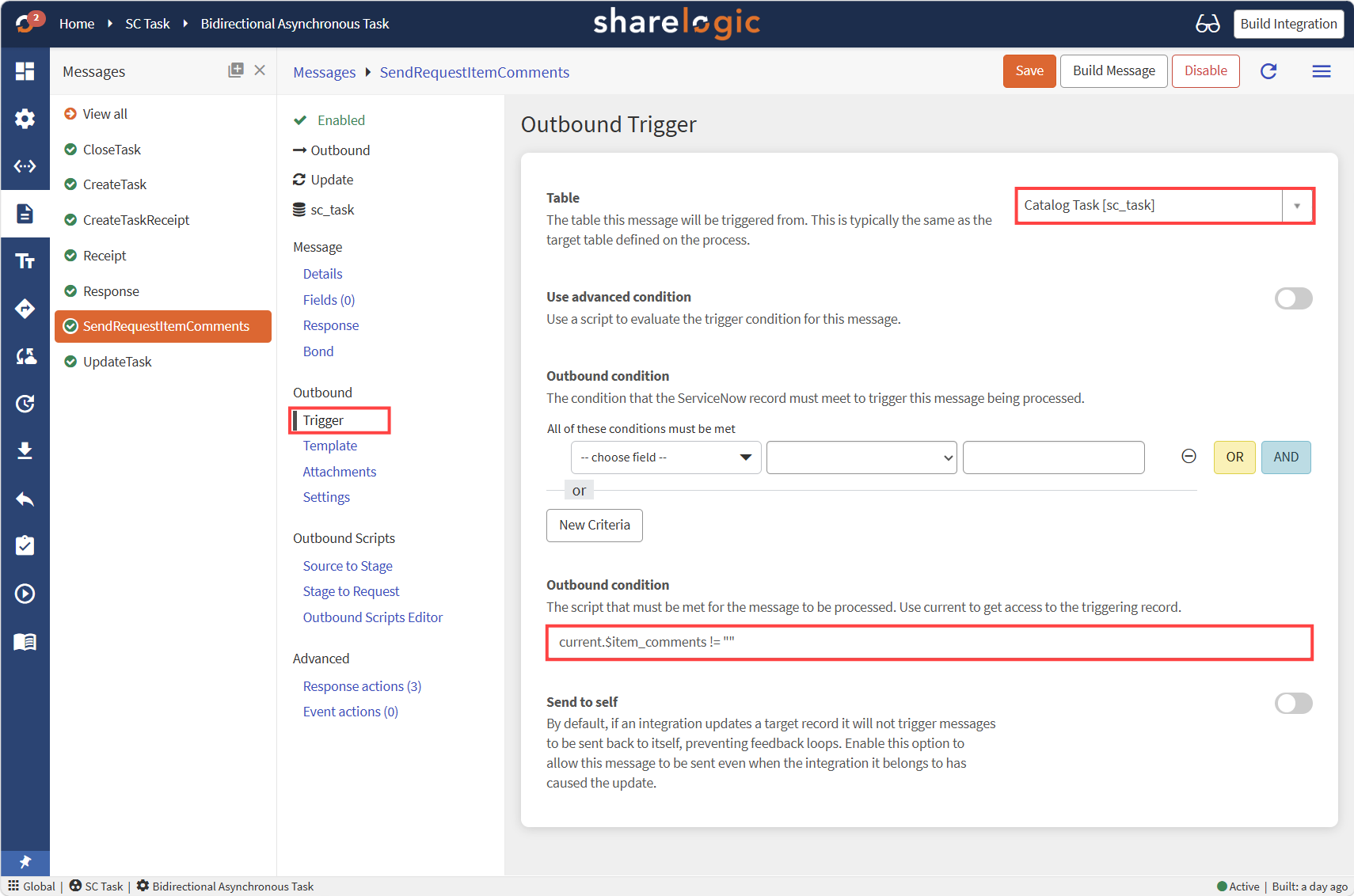
### Outbound Trigger

We can augment the `current` object with our own variable which we can detect in Unifi to act as the trigger.

Set the **Outbound condition** for this message to `current.$item_comments != ""` . We will write to `$item_comments` property from a **Business Rule** configured later on.&#x20;

<figure><img src="https://3662067745-files.gitbook.io/~/files/v0/b/gitbook-x-prod.appspot.com/o/spaces%2FDk6VgKBXe6rYT8F9wuaY%2Fuploads%2FtnAP7mbbUyIpHsNFiIOQ%2FIRE-Trigger.png?alt=media&amp;token=26e4e05b-9033-4ac2-91b0-98137e0d0e95" alt=""><figcaption></figcaption></figure>

### Other Message Settings

The following settings are to be configured on the message. All other settings may be left as default.

* Message > Bond: **Bond pending** & **Bond open**
* Message > Response: Configure to your integration
  * As our example integration is **Async**; a **Response** and **Receipt** message are needed.

## Field

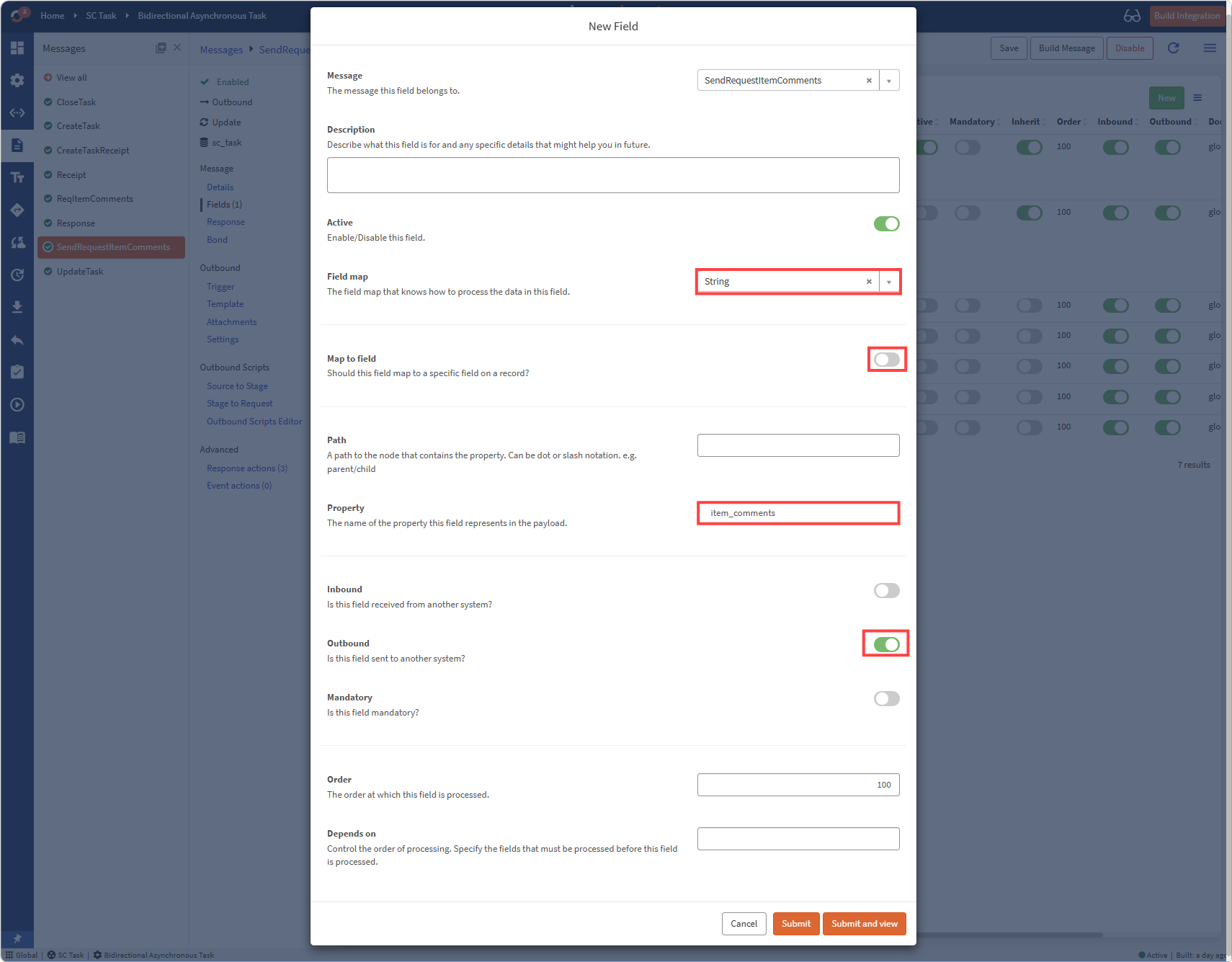
We will configure a new field that sends our comment data: `$item_comments`.

The `$item_comments` field uses the **String** field map included with Unifi.

Field configuration is as follows:&#x20;

<table data-search="false"><thead><tr><th>Field</th><th>Description</th><th>Value</th></tr></thead><tbody><tr><td>Message</td><td>The message this field applies to.</td><td><em>Your Message:</em><br><em>'SendRequestItemComments'</em></td></tr><tr><td>Active</td><td>If the field is enabled or not.</td><td>'True'</td></tr><tr><td>Map to Field</td><td>If the field gets its value from a specific field on the source record.</td><td>'False'</td></tr><tr><td>Path</td><td>Path containing this value outbound.</td><td><em>Empty</em></td></tr><tr><td>Property</td><td>The property name used in the payload.</td><td>'item_comments'</td></tr><tr><td>Inbound</td><td>Is this field received inbound?</td><td>'False'</td></tr><tr><td>Outbound</td><td>Is this field sent outbound?</td><td>'True'</td></tr><tr><td>Mandatory</td><td>Is this field required?</td><td>'False'</td></tr></tbody></table>

*The new field will look like the following:*&#x20;

<figure><img src="https://3662067745-files.gitbook.io/~/files/v0/b/gitbook-x-prod.appspot.com/o/spaces%2FDk6VgKBXe6rYT8F9wuaY%2Fuploads%2FhDtLjuR7zHqcFFiLfcu9%2FIRE-Field.png?alt=media&amp;token=5aba91ae-7938-4864-bcce-1edc0ec61a02" alt=""><figcaption></figcaption></figure>

### Other Fields

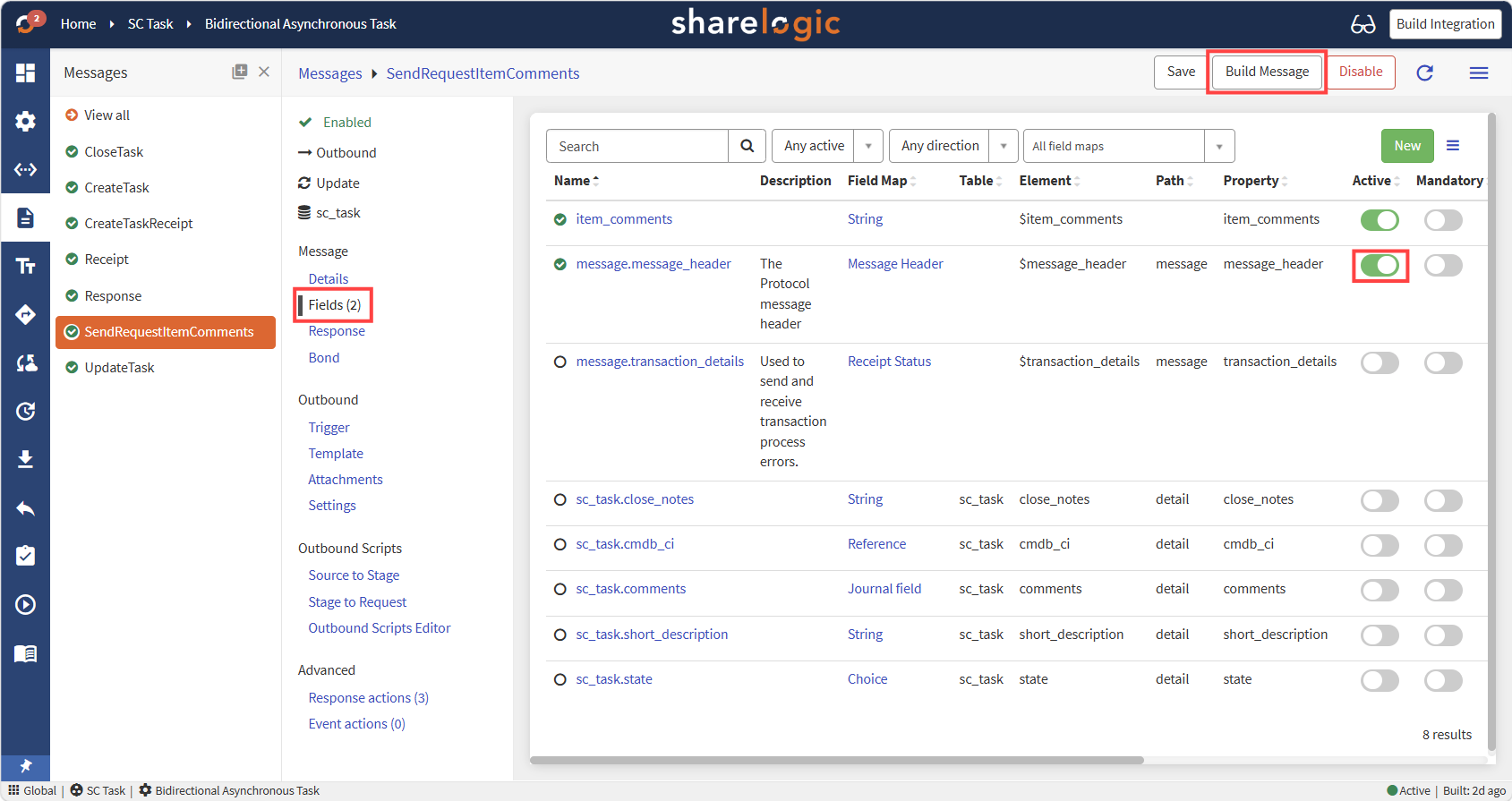
On our integration we also enabled the message\_header field, which handles references and message names. If any other fields are to be sent from the `sc_task` they may also be enabled.

<figure><img src="https://3662067745-files.gitbook.io/~/files/v0/b/gitbook-x-prod.appspot.com/o/spaces%2FDk6VgKBXe6rYT8F9wuaY%2Fuploads%2FN9MYKg2gEErplhCPfvU1%2FIRE-messageField.png?alt=media&amp;token=4ebf4b56-5729-4631-ada5-0340347bf6bb" alt=""><figcaption></figcaption></figure>

With all relevant fields enabled, the new message may be built with the **Build Message** button.

## Business Rule

Now we have a message; we will set it to be triggered with a **Business Rule**.

The rule will trigger when comments are added to `sc_req_item`. It will check if the `sc_req_item` has a bonded `sc_task` and if so, comments will be stored on the `sc_task` record and our message will be triggered.

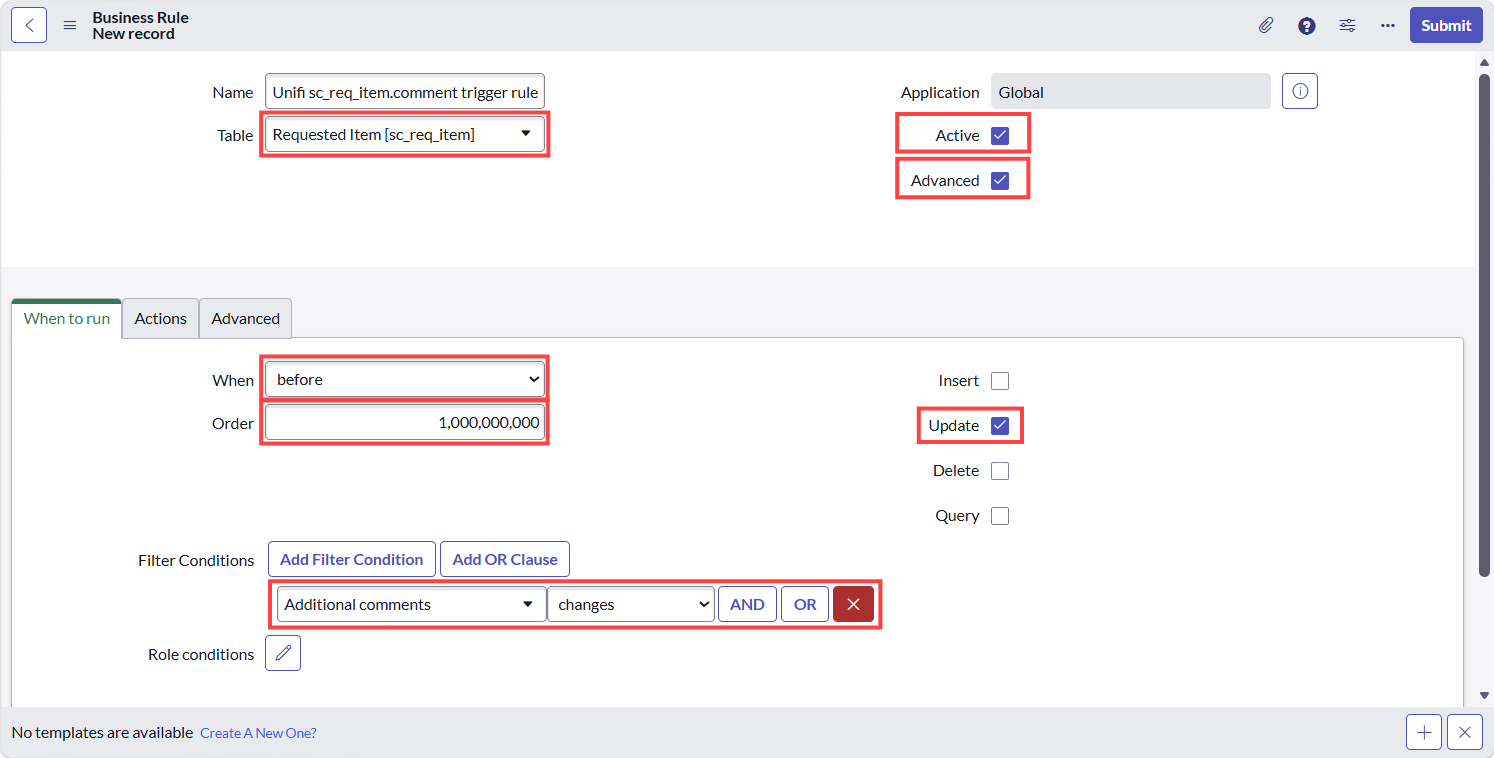
Navigate to the **Business Rules** list. Click **New**.

Configure the new Rule as follows:

| Field    | Description                                         | Value                                        |
| -------- | --------------------------------------------------- | -------------------------------------------- |
| Name     | Select a name that matches your naming conventions. | 'Unifi sc\_req\_item.comment trigger rule'\* |
| Table    | The related records table                           | 'Requested Item \[sc\_req\_item]'\*          |
| Active   |                                                     | 'True'                                       |
| Advanced |                                                     | 'True'                                       |

*\*values specific to the example integration adapt to different use cases.*

### *When to run values*

| Field             | Description                                                                                            | Value                           |
| ----------------- | ------------------------------------------------------------------------------------------------------ | ------------------------------- |
| When              |                                                                                                        | 'before'                        |
| Order             | High number to run after all other rules.                                                              | '1000000000'                    |
| Insert            | No need to run this rule on insert as `sc_req_item` may not be related to `sc_task` till after insert. | 'False'                         |
| Update            | Check the rule on each update.                                                                         | 'True'                          |
| Filter Conditions | What triggers the rule.                                                                                | 'Additional comments changes'\* |

<figure><img src="https://3662067745-files.gitbook.io/~/files/v0/b/gitbook-x-prod.appspot.com/o/spaces%2FDk6VgKBXe6rYT8F9wuaY%2Fuploads%2Fd7gpuYQBqoomg2FTBFgW%2FIRE-BusinessRuleCreate.png?alt=media&amp;token=2516d51a-67a8-4290-b318-719ac49c8228" alt=""><figcaption></figcaption></figure>

**Insert and stay** on the new record.

### Advanced Script

Open the rules **Advanced** section:

Here we enter a **Script** to look up the integrated record with the bond we will use.

In our case we look for `sc_task` where the `sc_req_item` is the **Request item**. Then check if this record is bonded. For each bonded `sc_task` record the `$item_comments` field is added and Unifi is triggered to check for Messages that should be sent by the integration.&#x20;

The key to this functionality is we find the bonded record, augment it with the data we want to send (i.e. the comments we want to send in `$item_comments`), and then trigger Unifi processing with the bonded record - in this case the `sc_task`.

Code for this is as follows; you can adapt it to your use case as required:

{% code lineNumbers="true" %}

```javascript
(function executeRule(current, previous /*null when async*/) {
  x_snd_eb.ws_console.logExecute("Business rule: Unifi " + current.getTableName() + ".comment trigger rule", function () {
    x_snd_eb.ActivityLog.setDocument(current, "sys_script");
      /* Look for bonded sc_tasks related to this item */
      sendToBondedTasks(current);
    }
  );
  
  function getTasks(current) {
    var tasks = [];
    var task = new GlideRecord("sc_task");
    task.addQuery("request_item", "=", current.sys_id);
    x_snd_eb._console.logQuery(task);
    
    while (task.next()) {
      tasks.push(task.getUniqueValue());
    }
    return tasks;
  }
  
  function getBonds(tasks) {
    var bond = new GlideRecord("x_snd_eb_bond");
    bond.addQuery("document", "IN", tasks);
    bond.addQuery("state", "!=", "Closed"); // Ignore closed bonds
    x_snd_eb._console.logQuery(bond);
    return bond;
  }
  
  function sendToBondedTasks(current) {
    var tasks = getTasks(current);
    if (!tasks.length) {
      x_snd_eb._console.debug('No child tasks found.');
      return;
    }
    
    // Look for bonded items
    var bond = getBonds(tasks);
    if (!bond.hasNext()) {
      x_snd_eb._console.debug('No bonds found.');
      return;
    }
    
    while (bond.next()) {
      // Send comments to each bonded task found
      var task = bond.document.getRefRecord();
      task.$item_comments = current.getValue("comments");
      x_snd_eb.Message.processOutbound(task);
    }
  }
})(current, previous);
```

{% endcode %}

**Save** the new script.

Now, if everything is configured correctly, when you add a comment to a Requested Item which has a bonded Catalog Task linked to it, you should have a new Transaction with an HTTP Request that contains your comments.