# Edit Child Poll Processor

{% hint style="info" %}
Rather than just making edits to the existing Child Poll Processor, we will instead copy it & edit the copy. That way we will have one Child Poll Processor that just polls for updates and another that polls for updates and attachments.
{% endhint %}

## Copy Child Poll Processor

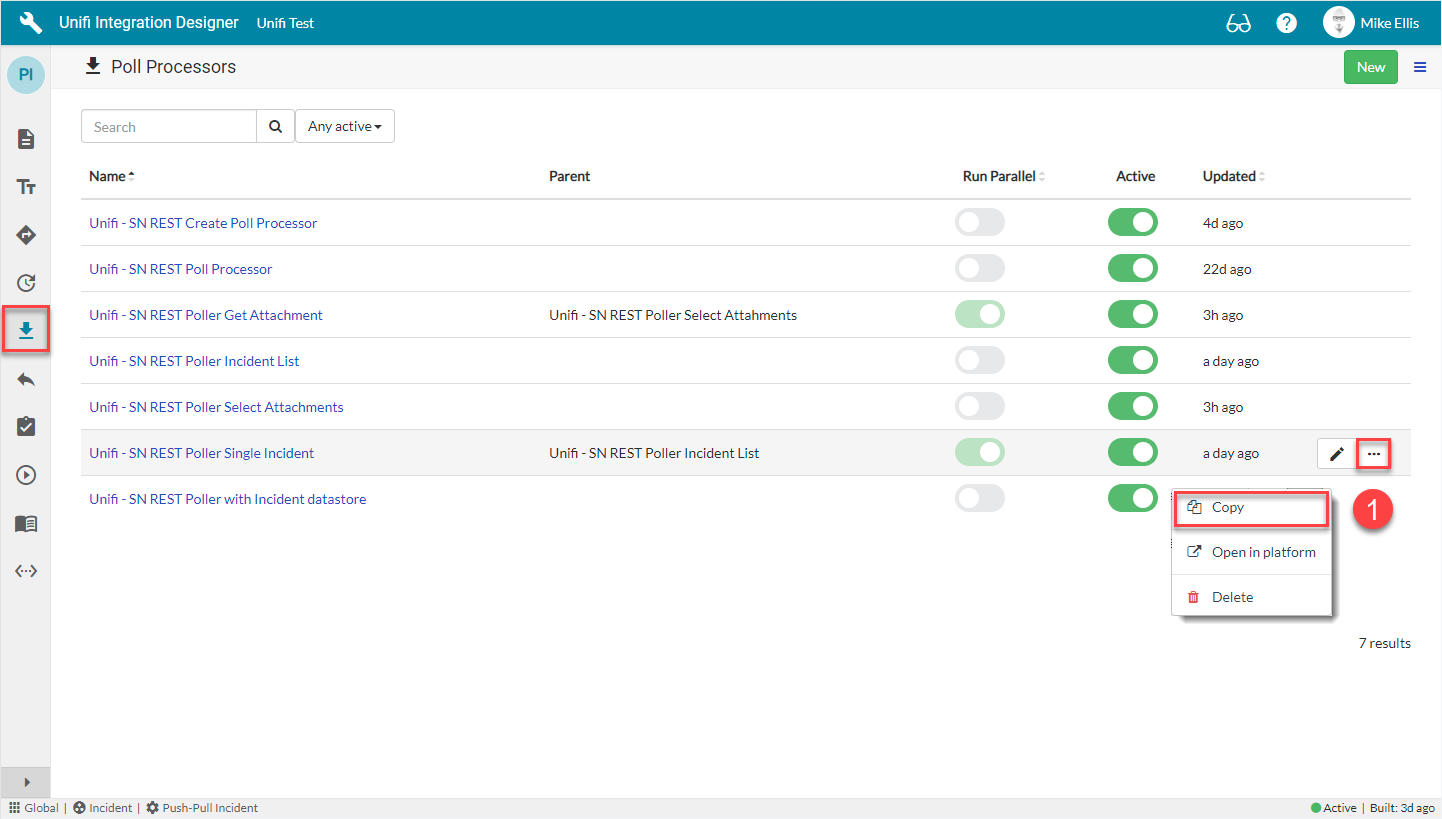
To copy the Child Poll processor, in **Unifi Integration Designer**, click the **'Poll Processors' Icon**.

<img src="https://605238050-files.gitbook.io/~/files/v0/b/gitbook-legacy-files/o/assets%2F-MQBk35gIi557UHt7QlJ%2F-MguB2qBmrb2RTJX1gZY%2F-MguSVyhJfog6_q0_9ub%2FIAPG%20-%20Edit%20Child%20Poll%20Processor%201.png?alt=media&#x26;token=8a055b6b-efcc-4cb8-b8c5-ee07c139c33b" alt="" data-size="original">

Click the **ellipsis** to the right of **< Your Child Poll Processor >** *(created following the* [*Incident Parent and Child Poller Guide*](https://docs.sharelogic.com/unifi/3.1/integration-guides/incident-parent-and-child-poller-guide/polling/child-poll-processor)*)* & then click **Copy**.

## Copy Poll Processor Modal

Click **Copy**.

*Your Copy Poll Processor modal should look like this:*

![](https://605238050-files.gitbook.io/~/files/v0/b/gitbook-legacy-files/o/assets%2F-MQBk35gIi557UHt7QlJ%2F-MguB2qBmrb2RTJX1gZY%2F-MguDWUhzQZMWoh1-7br%2FIAPG%20-%20Edit%20Child%20Poll%20Processor%202.png?alt=media\&token=50c9b328-7ae9-4208-ad10-8aff9742b94d)

You will be redirected to the Details page of the newly copied Poll Processor.

## Edit Copied Poll Processor

The fields to edit for the Copied Poll Processor are as follows:

<table><thead><tr><th width="154.67123287671237">Field</th><th width="324.7093181200761">Description</th><th>Value</th></tr></thead><tbody><tr><td>Name</td><td>The name of the Processor.</td><td>&#x3C;Your Name>*</td></tr></tbody></table>

{% hint style="info" %}
*\*Name: We've chosen to append the existing value with, "(with Attachments)".*
{% endhint %}

*Your Copied Poll Processor should look like this:*

![](https://605238050-files.gitbook.io/~/files/v0/b/gitbook-legacy-files/o/assets%2F-MQBk35gIi557UHt7QlJ%2F-MguB2qBmrb2RTJX1gZY%2F-MguEZJT2U77v40a-qiz%2FIAPG%20-%20Edit%20Child%20Poll%20Processor%203.png?alt=media\&token=e77d94af-c3ae-4744-92ce-71bdf3f42438)

Navigate to **Scripts > Response Script**.

## Response Script

The Response Script field is to be edited as follows:

<table><thead><tr><th width="150">Field</th><th width="245.8202209785727">Description</th><th width="334.3973540524215">Value</th></tr></thead><tbody><tr><td>Response Script</td><td>The script that processes the response to the request.</td><td>Update the code in the Response script field so that it looks like the code below</td></tr></tbody></table>

*The code in the Response script field should look like this:*

```javascript
// Process the response returned by the request script
// The 'answer' variable from the request script is passed in here as the 'response' parameter 
(function(poll_request, poller, response, params) {

    // DataStore name constant
    // Storage of time based High Water Marker
    var ATTACHMENT_HWM = 'attachment_hwm';

    var body = JSON.parse(response);

    // Nothing to do if no results were returned
    if (body.result.length == 0) {
        poll_request.response_status = 'No Incidents returned\n\n' + JSON.stringify(body, null, 2);
        return;
    }

    // Sample result (single Incident)
    /*
    {
      "result": {
        "sys_id": "0ecc4865db734010c3ebde82ca961960",
        "number": "INC0010107",
        "correlation_id": "INC0010345",
        "short_description": "Demo two - Fixing request",
        "description": "A long description",
        "state":"2",
        "sys_updated_on": "2020-04-02 14:00:00",
        "sys_updated_by": "a.user"
      }
    }    
    */

    // Establish the environment
    var integration = poller.getIntegration();
    var config = integration.getConfig();
    var conn = integration.getActiveConnection();
    var cvars = conn.getVariables();

    var poll_helper = new x_snd_eb.PollHelper(poll_request);
    var info = [];

    // Use Unifi code to find the Bond for an Incident
    function get_bond(inc) {
        var bond = new x_snd_eb.Bond(config);
        bond.locateReference(integration, inc.correlation_id, inc.sys_id);
        if (!bond.isValidRecord()) {
            return null;
        }
        return bond;
    }

    // Work out the message type to send to Unifi based upon the change of state
    function get_message_name(curr, prev) {

        // Default message type is an update
        var message_name = 'UpdateIncidentInbound';

        // Use the default type if we have no previous state
        if (!prev || !prev.state) {
            return message_name;
        }

        // Use the default type if there is no change in state
        if (curr.state == prev.state) {
            return message_name;
        }

        // We know the state has changed, check if it is Resolved (6)
        if (curr.state == '6') {
            message_name = 'ResolveIncidentInbound';
        }

        return message_name;
    }

    function execute_child_poller(inc, bond) {

        if (!bond) {
            return {};
        }

        // Set up a Poll to check for new attachments
        x_snd_eb.Poller.execute(cvars.select_attachments_poller, {
            int_ref: inc.correlation_id,
            ext_ref: inc.sys_id,
            attachment_hwm: bond.getData(ATTACHMENT_HWM, '')
        });

    }

    function process_incident(inc) {

        // Log the incident number and time
        var inc_time = inc.sys_updated_on;
        info.push('Incident : ' + inc.number + ' (' + inc_time + ')');

        // Find the bond on which the previous data is stored
        var bond = get_bond(inc);

        // If no bond was found, ignore this incident
        if (!bond) {
            info.push('- Bond not found - Incident ignored');
            return;
        }

        // Get the data stored for the incident by a previous poll
        var previous_inc = bond.getDataObject('previous_inc', {
            state: '2'
        });

        // Work out the message type to send into Unifi 
        var message_name = get_message_name(inc, previous_inc);
        info.push('- Message name: ' + message_name);

        // Set up the payload object for passing into Unifi
        var payload = {
            message: {
                name: message_name,
                source_reference: inc.sys_id
            },
            detail: {
                short_description: inc.short_description,
                description: inc.description,
                state: inc.state,
                close_code: inc.close_code,
                close_notes: inc.close_notes
            }
        };

        // Submit the message into Unifi
        poll_helper.processInbound({
            payload: JSON.stringify(payload)
        });

        // Check for Attachments
        execute_child_poller(inc, bond);

        // Save the current incident as the previous incident for the next poll
        bond.setDataObject('previous_inc', inc);

        // Update last update time (if later)
        var conn_time = conn.getData('last_update_time', '');
        if (inc_time > conn_time) {
            conn.setData('last_update_time', inc_time);
        }

    }

    // Process the single result
    process_incident(body.result);

    poll_request.response_status = info.join('\n') + '\n\n' + JSON.stringify(body, null, 2);

})(poll_request, poller, response, params);
```

{% hint style="info" %}
**Response script**: This script creates a variable to store a time based high water marker and parses the response into a body object to contain the result, (returning if it doesn't contain anything).

It then establishes the environment, getting the Integration, Configuration, Connection & Connection Variables and sets up the essential PollHelper() function (which we initialise from the poll\_request) along with the info \[] array.

After that it sets up some other functions: `get_bond()` finds the bond for the Incident (returning if there isn't one), `get_message_name()` works out the message type to send to Unifi based upon the change of state & `execute_child_poller()` sets up a Poll Request to check for new attachments.

It then processes each of the results (passed in tickets). For each, it logs the incident number & time, finding the bond & returning any previous data stored on the bond, deciding which Message to use, setting up a payload object and submitting it to Unifi by calling the `processInbound()` method. It then runs the `execute_child_poller()` function and saves the current incident as the previous incident for the next poll & checks whether the ticket was updated later than the last update time; if so, it sets and stores the last update time as that ‘sys\_updated\_on’ value (this ‘last\_update\_time’ is what the Setup script checks against when defining what the Poll will do).

On processing each result, it is then logged to the Response status field of the Poll Request.

**params**: The `params` object is passed through to the subsequent scripts (and on to further Pollers, if required). This is used to pass the int\_ref, ext\_ref & attachment\_hwm elements to the child Poller.

**Code Edits** - The following code snippets were added to the existing codebase to facilitate polling for attachments:

```javascript
    var ATTACHMENT_HWM = 'attachment_hwm';
```

This is a DataStore name constant to store a time based high water mark.

```javascript
 function execute_child_poller(inc, bond) {
 
         if (!bond) {
             return {};
         }
 
         // Set up a Poll to check for new attachments
         x_snd_eb.Poller.execute(cvars.select_attachments_poller, {
             int_ref: inc.correlation_id,
             ext_ref: inc.sys_id,
             attachment_hwm: bond.getData(ATTACHMENT_HWM, '')
         });
 
     }
```

The **x\_snd\_eb.Poller.execute()** method has two parameters. In the first we pass the sys\_id of the child Poller (as created on the '[Select Attachments Poller](https://docs.sharelogic.com/unifi/3.1/integration-guides/incident-attachment-poller-guide/select-attachments-poller#update-connection-variable)' page). In the second we pass an object containing the correlation\_id on the bonded Incident as the int\_ref element, the sys\_id of the bonded Incident as the ext\_ref element and the value of the ATTACHMENT\_HWM DataStore as the attachment\_hwm element (telling the child Poller which attachment records to poll).

```javascript
        execute_child_poller(inc, bond);
```

Causing the execute\_child\_poller() function to run (as set up above) - passing in the Incident & Bond.
{% endhint %}

*Your Response Script form should look like this:*

![](https://605238050-files.gitbook.io/~/files/v0/b/gitbook-legacy-files/o/assets%2F-MQBk35gIi557UHt7QlJ%2F-MguB2qBmrb2RTJX1gZY%2F-MguILjXdGS0j6I_hGFB%2FIAPG%20-%20Edit%20Child%20Poll%20Processor%204.png?alt=media\&token=fb52ca73-87ce-4cb4-8790-52a5cbddc591)

Click **Save**.

## Update Select Attachments Poll Processor

Navigate to and open the **Select Attachments Poll Processor** *(created on the '*[*Select Attachments Poll Processor'*](https://docs.sharelogic.com/unifi/3.1/integration-guides/incident-attachment-poller-guide/select-attachments-poll-processor#new-poll-processor) *page)* and update the value of the **Parent** field by selecting its parent Poll Processor created above.

{% hint style="info" %}
Remember, We have not scripted any business logic to run from the value in the Parent field. It is given for documentary purposes only (for you to easily identify which parent Poll Processor kicked off the child).
{% endhint %}

*The following Poll Processors should now be in place on the Integration:*

![](https://605238050-files.gitbook.io/~/files/v0/b/gitbook-legacy-files/o/assets%2F-MQBk35gIi557UHt7QlJ%2F-MguB2qBmrb2RTJX1gZY%2F-MguJEEYN-QV0rs59wUc%2FIAPG%20-%20Edit%20Child%20Poll%20Processor%205.png?alt=media\&token=35b633a5-0c66-4d1c-9372-85e684c7c4ef)

{% hint style="info" %}
We could Deactivate the copied "Unifi - SN REST Poller Single Incident" now that we've created this version, "with Attachments". However, we will instead edit the Child Update Poller that runs it.
{% endhint %}

Now let's move on and **edit** the **Child Update Poller** *(configured when following the Incident Parent and Child Poller Guide)* so that it runs the Poll Processor created above.
